How to buy
1. Register for a New Account
Members can enjoy special discounts and earn reward points.
*You can shop without registering for an account. However, member discounts and reward points cannot be used or earned unless you are registered and logged in.
>> New Account
*You can shop without registering for an account. However, member discounts and reward points cannot be used or earned unless you are registered and logged in.
>> New Account
2. Search for Products
Use the category menu at the top of the screen to browse products.
You can also use the search function at the top of the page to quickly find specific items.
If you are unsure which product to choose, please refer to the "First of all" guide.
>> First of all
For plates, click on your camera brand in the plate list. The compatible plate model numbers for your camera and lens will be displayed.
>> Plate list
*If your model number is not listed in the plate compatibility table, please contact us. >> Contact us
You can also use the search function at the top of the page to quickly find specific items.
If you are unsure which product to choose, please refer to the "First of all" guide.
>> First of all
For plates, click on your camera brand in the plate list. The compatible plate model numbers for your camera and lens will be displayed.
>> Plate list
*If your model number is not listed in the plate compatibility table, please contact us. >> Contact us
3. Check Product Information
On the Product Details page, you can view detailed information such as the product description and specifications. Click the "Add to cart" button to add the product to your shopping cart.
Register the Wish List (Members Only)
You can save products you are interested in to your "Wish List."
After logging in, you can access your Wish List from the "Wish List" menu at the bottom of the page.
After logging in, you can access your Wish List from the "Wish List" menu at the bottom of the page.
4. Add a Product to Cart
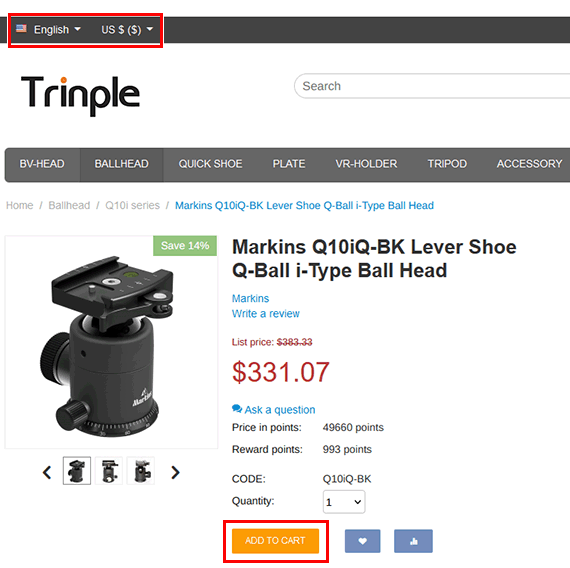
Click the "Add to cart" button on the product page to add the item to your cart.
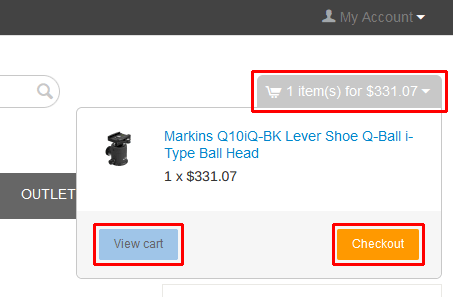
Click the cart summary (total quantity and amount) displayed in the upper right corner of the screen to review your cart contents.
To proceed directly to checkout, click the "Checkout" button. To review your cart in detail, click the "View Cart" button to open the cart contents page.
To proceed directly to checkout, click the "Checkout" button. To review your cart in detail, click the "View Cart" button to open the cart contents page.
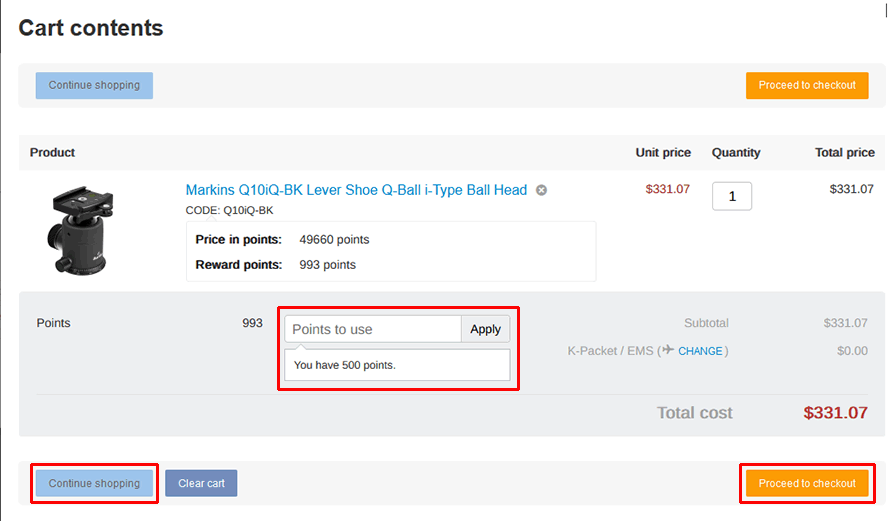
If you would like to use reward points toward your purchase, enter the number of points to use on this screen.
>> New Account
*The point input box will not appear in the following cases: a) You are not logged in. b) The products in your cart are not eligible for point usage.
If you click the "Continue shopping" button, you can keep shopping.
If you are ready to complete your purchase, click the "Proceed to checkout" button.
>> New Account
*The point input box will not appear in the following cases: a) You are not logged in. b) The products in your cart are not eligible for point usage.
If you click the "Continue shopping" button, you can keep shopping.
If you are ready to complete your purchase, click the "Proceed to checkout" button.
5. Checkout
5-1. Confirmation of Your Order
Please review your order details, customer information, and shipping address.
*If you are a registered member but not logged in, please log in first.
*If you are not registered as a member, please enter your customer information and shipping address.
*If you are a registered member but not logged in, please log in first.
*If you are not registered as a member, please enter your customer information and shipping address.
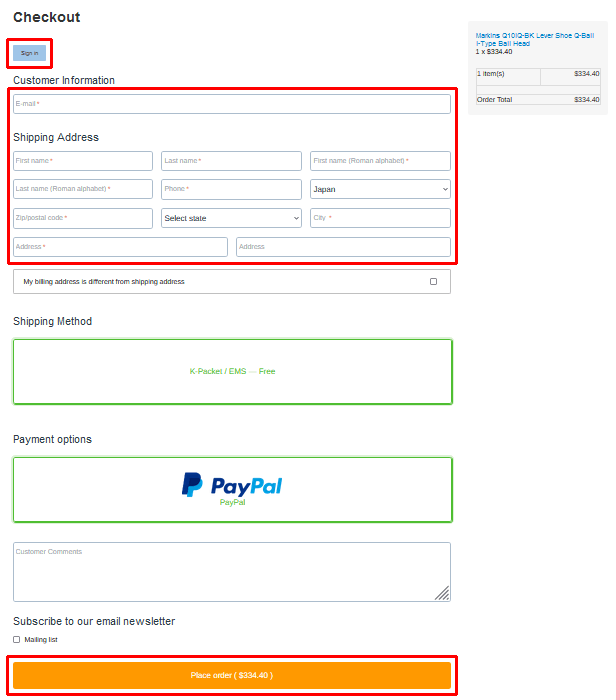
5-2. Place Your Order
Click the [Place order] button to proceed to the PayPal payment screen.
5-3. Payment via PayPal
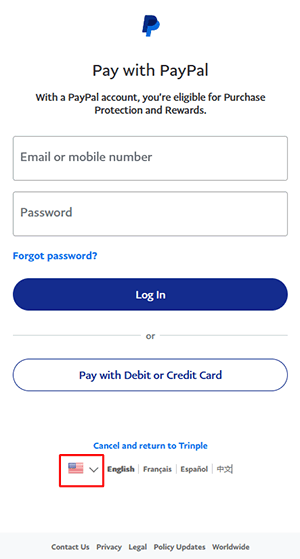
If you do not have a PayPal account, click the "Pay with Debit or Credit Card" button to proceed as a guest.
Once your payment is successfully completed, a confirmation message will appear on the screen.
An order confirmation email will also be sent to your registered email address.
6. After Your Order
Your order will be processed after payment has been confirmed by our company.
Orders confirmed before 10:00 AM (JST) on a business day are generally shipped the same day. Orders confirmed after that time will be shipped on the next business day.
Please note that shipments are made on business days only.
If your order includes temporarily out-of-stock items, we will inform you of the expected shipping date by email.
Orders confirmed before 10:00 AM (JST) on a business day are generally shipped the same day. Orders confirmed after that time will be shipped on the next business day.
Please note that shipments are made on business days only.
If your order includes temporarily out-of-stock items, we will inform you of the expected shipping date by email.